mask2former_tensorflow2
Mask2Former with TensorFlow
This project is an implementation of Mask2Former using the TensorFlow framework. The goal is to provide a clear explanation of how Mask2Former works and demonstrate how the model can be implemented with TensorFlow.
Mask2Former TensorFlow
About Mask2Former
Mask2Former is a model designed for computer vision tasks, specifically instance segmentation.
Masked-attention Mask Transformer for Universal Image Segmentation, Bowen Cheng, Ishan Misra, Alexander G. Schwing, Alexander Kirillov, Rohit Girdhar arXiv preprint (arXiv:2112.01527)
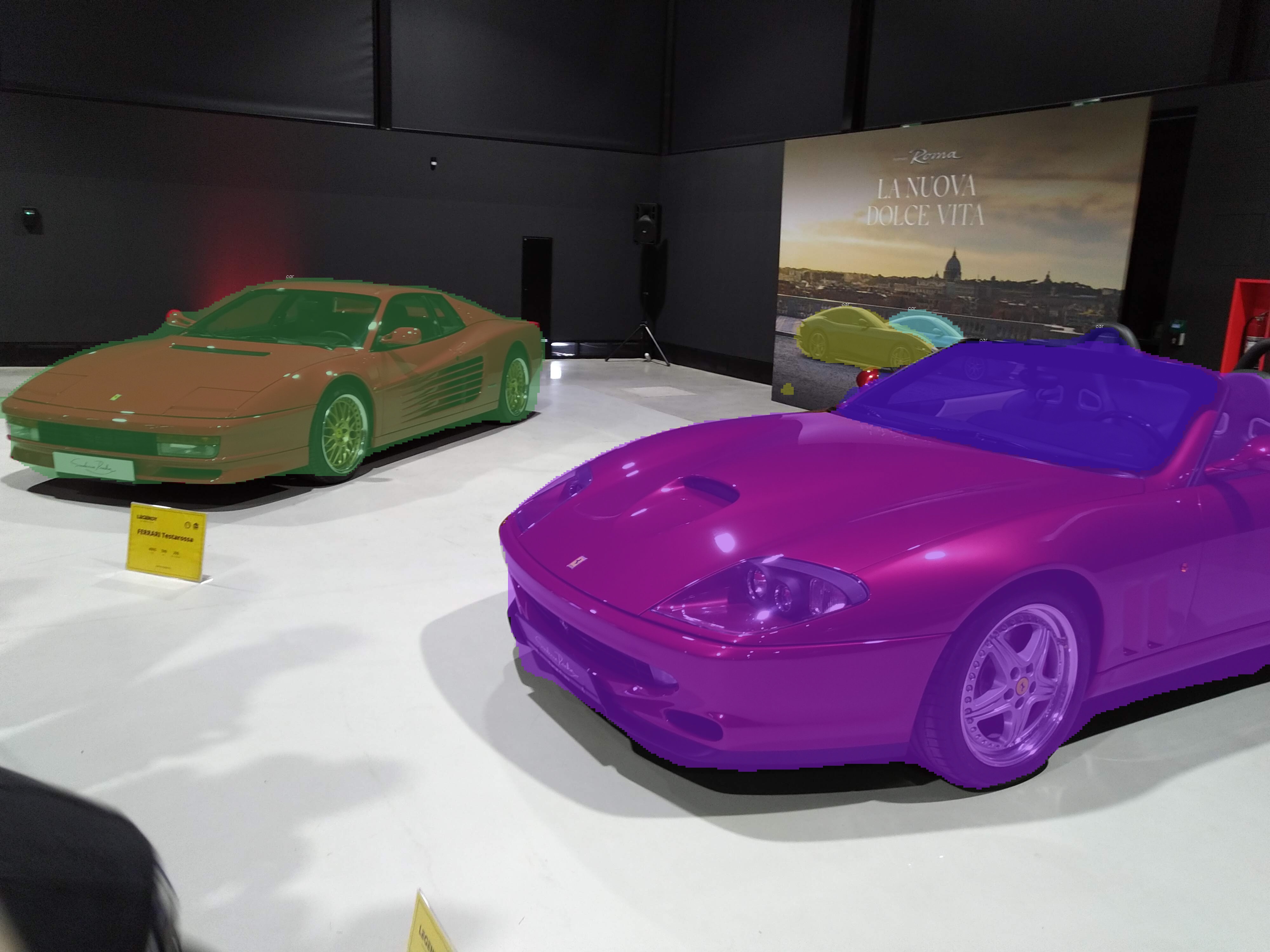
To understand instance or panoptic segmentation better, consider the example below, where multiple objects—whether of the same or different classes—are identified as separate instances, each with its own segmentation mask (and the probability of belonging to a certain class):
Current implementation of Mask2Former supports two backbones:
- ResNet-50 (default) — ImageNet pre-trained, “caffe”-style BGR preprocessing.
- MobileNetV4ConvMedium — lightweight pure-convolution backbone from
tf-models-official, suitable for mobile/edge deployment. Trained from scratch with [0, 1] RGB preprocessing.
Installation, Dependencies, and Requirements
The project has been tested on Ubuntu 24.04.2 LTS with nvcr.io/nvidia/tensorflow:25.02-tf2-py3 container using TensorFlow 2.17.0. It may work on other operating systems and TensorFlow versions (older than 2.17.0), but we cannot guarantee compatibility.
If you don’t use the container, you need to install the following dependencies:
- Python 3.12.3
- All dependencies are listed in
requirements.txt. - Use
setup.shto install all dependencies on Linux.
Note: A GPU with CUDA support is highly recommended to speed up training.
Datasets
The code supports datasets in the COCO format. We recommend creating your own dataset to better understand the full training cycle, including data preparation. LabelMe is a good tool for this. You don’t need a large dataset or many classes to begin training and see results. This makes it easier to experiment and learn without requiring powerful hardware.
Alternatively, you can use the original COCO dataset, which contains 80 object categories. You can also train your own large dataset because the model suits well for this task.
For high-performance results we chose TFRecord format for the dataset. TensorFlow is able to use TFRecord format files for parallel reading and is compatible with TensorFlow Graph Mode. To use the dataset, follow these steps:
1) Convert your COCO dataset to TFRecord files:
python convert_coco_to_tfrecord.py \
  --images_root /path/to/images \
  --annotations /path/to/instances_train.json \
  --output /path/to/out/train.tfrecord \
  --num_shards 4
python convert_coco_to_tfrecord.py \
  --images_root /path/to/images \
  --annotations /path/to/instances_val.json \
  --output /path/to/out/test.tfrecord \
  --num_shards 4
For Panoptic Segmentation:
python convert_coco_to_tfrecord.py \
  --images_root /path/to/images \
  --annotations /path/to/panoptic_train.json \
  --panoptic_masks_root /path/to/panoptic_masks \
  --output /path/to/out/panoptic_train.tfrecord \
  --num_shards 4
2) Set corresponding settings in config.py file:
self.tfrecord_dataset_directory_path  = 'path/to/tfrecords/train/directory'
self.tfrecord_test_path = 'path/to/tfrecords/test/directory'
For Panoptic Segmentation:
self.use_panoptic_dataset = True
self.tfrecord_panoptic_dataset_directory_path = 'path/to/tfrecords/panoptic_train/directory'
self.tfrecord_panoptic_test_path = 'path/to/tfrecords/panoptic_test/directory'
Configuration
All configuration parameters are defined in config.py file within the Mask2FormerConfig class.
(Optionally) Set the path to your COCO root directory:
self.coco_root_path = '/path/to/your/coco/root/directory'
Set the path to your COCO training dataset:
self.tfrecord_dataset_directory_path = 'path/to/tfrecords/directory'
Set the path to the dataset’s annotation file:
self.train_annotation_path = f'{self.coco_root_path}/annotations/instances_train2017.json'
For Panoptic Segmentation:
# Panoptic Segmentation
self.use_panoptic_dataset = True
self.panoptic_train_annotation_path = f'{self.coco_root_path}/annotations/panoptic_train2017.json'
self.tfrecord_panoptic_dataset_directory_path = 'path/to/tfrecords/panoptic_train/directory'
self.tfrecord_panoptic_test_path = 'path/to/tfrecords/panoptic_test/directory'
And you can find other intuitive parameters:
# Image parameters
self.img_height = 480
self.img_width = 480

# Transformer architecture parameters
self.transformer_input_channels = 256 # Channel dimension for transformer inputs
self.num_decoder_layers = 6           # Number of transformer decoder layers
self.num_heads = 8                    # Number of attention heads
self.dim_feedforward = 1024           # Feed-forward network dimension

# Backbone selection: "resnet50" (default) or "mobilenetv4"
self.backbone_type = "resnet50"

# If load_previous_model = True: load the previous model weights.
self.load_previous_model = False
self.lr = 0.0001
self.batch_size = 16
# If load_previous_model = True, the code will look for the latest checkpoint in this directory or use this path if it is a specific checkpoint file.
self.model_path = './checkpoints'  # example for specific checkpoint: self.model_path = './checkpoints/ckpt-5'

# Save the model weights every save_iter epochs:
self.save_iter = 1
self.approx_coco_train_size = 118287
# Number of epochs
self.epochs = 100

# Testing configuration
self.test_model_path = './checkpoints'  # example for specific checkpoint: self.test_model_path = './checkpoints/ckpt-5'
self.score_threshold = 0.5

# Accumulation mode
self.use_gradient_accumulation_steps = False
self.accumulation_steps = 8

# Dataset options
self.tfrecord_test_path = f'{self.coco_root_path}/tfrecords/test'  # Path to TFRecord test dataset directory. Used for mAP calculation.
self.augment = True
self.shuffle_buffer_size = 4096  # TFRecord dataset shuffle buffer size. Set to None to disable shuffling
self.warmup_steps = 10000

# Whether to print the model summary at the beginning of training
self.show_model_summary = False
Docker file
The docker files are available in the docker directory. nvcr.io/nvidia/tensorflow:25.02-tf2-py3 doesn’t contain all the required dependencies, so we provide custom containers depending on the chosen backbone:
docker/my-tf: Use this container for the default ResNet50 backbone.docker/my-tf-mobile: Use this container when using the MobileNetV4 backbone. It installs additional dependencies (liketf-models-official) and applies specific patches needed for the lightweight mobile setup.
Training
To start training, run:
python train.py
Using the container:
docker run --rm --ipc host --gpus all -v /path/to/Mask2Former/directory:/opt/project -v /path/to/datasets/Cocodataset2017:/path/to/datasets/Cocodataset2017 -w /opt/project --entrypoint= my-tf:latest python train.py
Model weights are saved in the checkpoints directory every cfg.save_iter epochs.
To proceed training:
1) Set configuration parameter load_previous_model to True:
self.load_previous_model = True
2) Set the path to the previously saved model. By default, the latest checkpoint will be used:
self.model_path = './checkpoints' # example for specific checkpoint: self.model_path = './checkpoints/ckpt-5'
Testing
To test the model:
1) Move your test images in the /images/test directory.
2) In the config file, set the path to the model weights you want to test. By default, the latest checkpoint will be used:
self.test_model_path = './checkpoints' # example for specific checkpoint: self.test_model_path = './checkpoints/ckpt-5'
3) Run the test script:
python test.py
Using the container:
docker run --rm --ipc host --gpus all -v /path/to/Mask2Former/directory:/opt/project -v /path/to/datasets/Cocodataset2017:/path/to/datasets/Cocodataset2017 -w /opt/project --entrypoint= my-tf:latest python test.py
Output images with masks and class labels will be saved in the /images/res directory.
Dataset Evaluation
It is possible to evaluate the data fed to the model before training to ensure that the masks, classes, and scales are applied correctly:
This script generates images with instance or panoptic masks and their corresponding category labels. The outputs are saved in images/dataset_test.
By default, it processes the first 200 randomly selected images. To change or remove this limit, edit test_dataset.py.
Test mAP
There is possibility to evaluate how accurate the model is.
1) Set the path to the test dataset in config file:
self.tfrecord_test_path = path/to/tfrecords/test/directory' # Path to TFRecord test dataset directory. Used for mAP calculation.
For Panoptic Segmentation:
# Panoptic Segmentation
self.use_panoptic_dataset = True
self.tfrecord_panoptic_test_path = 'path/to/tfrecords/panoptic_test/directory'
2) Run the test mAP script:
python test_map.py
Tasks for nearest future
- Add support for multi GPU training.
Thank you
We appreciate your interest and contributions toward improving this project. Happy learning and using Mask2Former!